

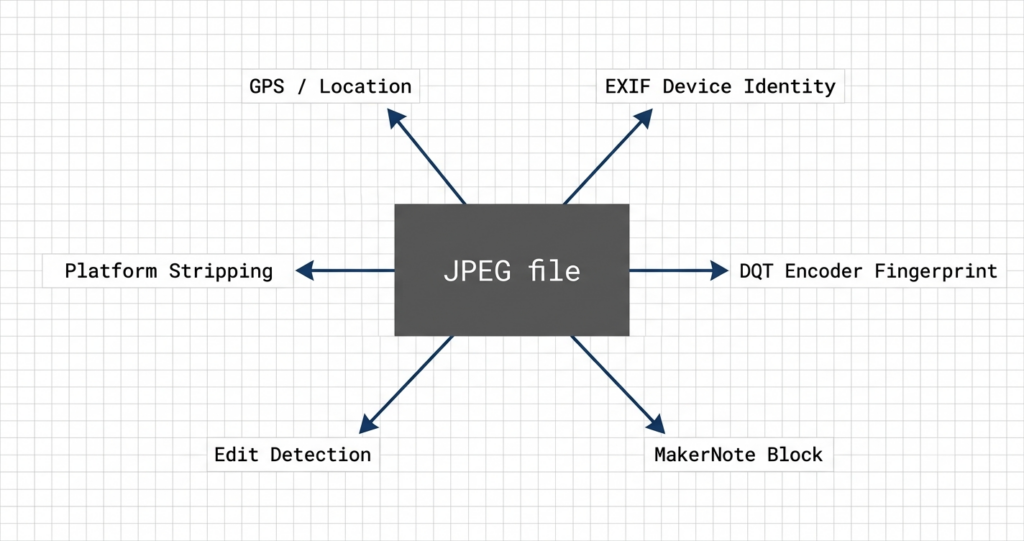
JPEG forensic analysis is the process of reading every layer of information a JPEG file contains — not just the metadata visible in a photo viewer, but the compression structure, manufacturer data blocks, and artefacts written at capture time that most editing tools never touch. This guide covers all six forensic signals: where each one lives in the file, what it reveals, and what it means when signals agree or conflict.
snapWONDERS has been analysing photo metadata and privacy exposure for years. Over the past year that work has pushed further into forensic depth, and I’ve been writing about each of these signals individually as they were built out. This is the reference that brings them together.
Signal 1: GPS and location metadata
The most widely known signal. When location services are enabled at capture, GPS coordinates are written into the EXIF header — latitude, longitude, altitude, and a separate GPS datestamp. On most smartphones this is on by default.
The forensic treatment of GPS goes well past reading the coordinates:
Editability. GPS is a plain-text EXIF field. It can be changed, deleted, or fabricated in seconds using any metadata editor. A coordinate pair carries low evidentiary weight on its own.
Cross-reference value. GPS becomes meaningful when it is checked against the other signals. A GPS location that contradicts the timezone offset in the timestamp, or the cellular region implied by MakerNote data, is itself a finding. Consistency across signals is what builds confidence; a single field in isolation proves very little.
Accuracy metadata. The GPS block often includes dilution of precision (DOP) — a measure of how reliable the fix was at capture — and the number of satellites acquired. A “perfect” GPS fix recorded in an underground car park is implausible and worth questioning.
What GPS cannot tell you: anything about what happened to the file after capture. And its absence is not suspicious — GPS is routinely disabled, stripped by platforms, or unavailable indoors. I covered the forensic treatment of GPS in detail in Why GPS in photos is more dangerous than most people think, including why presence of coordinates does not prove location, and what forensic analysis looks for to corroborate or contradict them.
Signal 2: EXIF device identity
The standard EXIF fields record the camera make and model, the software version, lens information, shutter speed, aperture, ISO, focal length, and both a creation timestamp and a digitisation timestamp. Together these fields describe the device and its configuration at capture.
The forensic questions here are not “what does the EXIF say” but “is the EXIF consistent with the rest of the file?”:
Make and model vs. encoder fingerprint. The camera model in EXIF should match the compression characteristics of that device (Signal 3 below). A file claiming to be from one device but carrying the encoder fingerprint of a different device or a software tool is a finding. The confirmed make/model profiles this comparison draws on are catalogued in snapWONDERS’ device fingerprint database, browsable by manufacturer.
Software field. When a file is opened and re-saved in an editing application, the software field typically updates to reflect that tool. A file with an unedited-camera-original claim but a software field showing an editing application warrants scrutiny.
Timestamp consistency. EXIF records creation time, original digitisation time, and — in some implementations — a timezone offset. These should be internally consistent and consistent with the GPS datestamp if GPS is present. Divergence between them is a finding.
EXIF fields are easy to modify. Their value in forensic analysis is in comparison with signals that cannot be easily changed.
Signal 3: The DQT encoder fingerprint
This is the signal most people are unaware exists, and the one I find most forensically significant.
JPEG compression works by dividing an image into 8×8 pixel blocks and applying a quantisation step — reducing detail at each spatial frequency according to a table of values embedded in the file header. This quantisation table (the DQT block) is a byproduct of the encoding process, not a metadata field.
Every encoder uses different tables. Canon DSLRs produce one set; Nikon produce another; Samsung phones differ from iPhones; Lightroom differs from Photoshop. The tables derive from the encoder implementation — they are firmware and software fingerprints, embedded silently in every JPEG produced.
I built a database of these fingerprints from scratch, empirically derived from a very large corpus of images. The result is a reference set that matches a JPEG to the specific camera firmware or software that encoded it — even after all EXIF has been stripped.
Two things follow from this:
Stripping EXIF does not strip the encoder fingerprint. The DQT block is part of the JPEG bitstream structure, not a metadata appendage. Standard EXIF-stripping tools remove the APP1 metadata header; they leave the quantisation tables untouched. A stripped photo still carries its encoder signature.
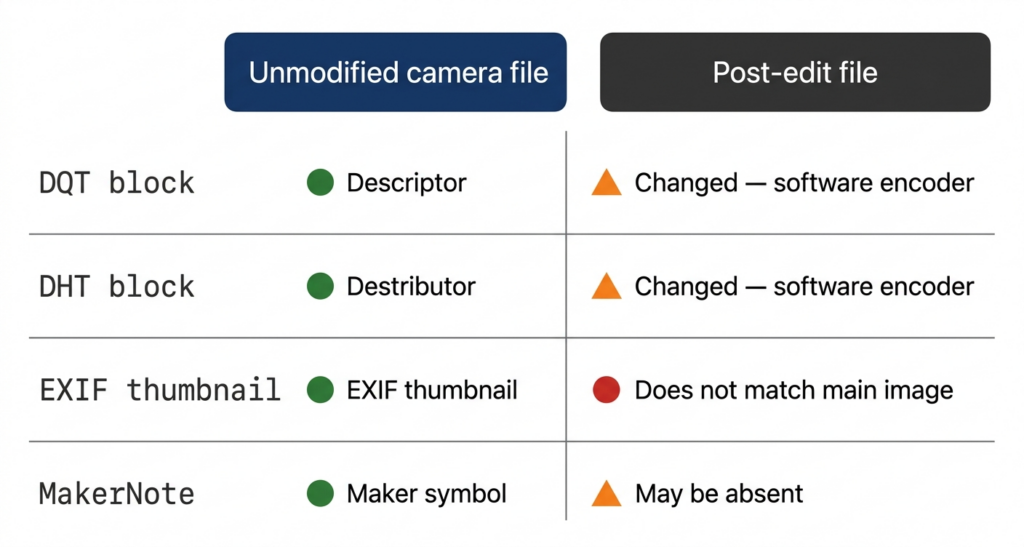
Re-encoding changes the fingerprint. If a photo is opened and re-saved by editing software, the DQT tables typically change to match that software’s encoder — and that change is detectable. A file whose EXIF claims to be a direct camera output but whose DQT tables belong to an editing tool has been processed after capture.
The full technical account is in How I built a JPEG encoder fingerprint database from scratch and Your camera’s fingerprint survives EXIF stripping — here’s how.
Signal 4: The MakerNote block
Beyond the standard EXIF fields, every major camera manufacturer writes a proprietary data block into the JPEG header — the MakerNote. There is no published specification for MakerNote formats. Each manufacturer defines their own structure, often with nested sub-records and version-dependent layouts that analysts have reverse-engineered over many years.
What MakerNotes contain varies by manufacturer but typically includes:
- Autofocus data. Which AF mode was active, which focus point was selected, whether the subject was tracked.
- Lens identity. Lens model and in some cases the lens serial number, separate from the camera body.
- Firmware version. The specific firmware build running on the camera at capture time.
- Internal processing flags. Scene classification, noise reduction settings, in-camera JPEG processing parameters.
- Flash and metering detail. More granular than the standard EXIF flash and metering fields.
The forensic value of MakerNotes is twofold: greater specificity about device state at capture, and better survivability through editing workflows. Many editing tools that strip or rewrite standard EXIF leave MakerNote blocks intact — they are harder to parse correctly without manufacturer documentation. An intact MakerNote on a file whose standard EXIF has been carefully cleaned is itself a finding. It suggests the person removing metadata either did not know MakerNotes existed or lacked a tool that could parse them.
The specifics of what different manufacturers record, and how snapWONDERS decodes them, are in MakerNote forensics: what camera manufacturers hide inside every photo.
Signal 5: Edit detection
Edit detection is not a single signal — it is the result of comparing the other signals against each other, and against the expected state of an unmodified camera original. Three specific artefacts are particularly diagnostic:
Huffman table analysis (DHT block). Related to Signal 3 but distinct. In addition to the quantisation tables, JPEG files use Huffman encoding tables (stored in the DHT block) to compress the quantised data. Camera firmware uses the fixed default Huffman tables defined in JPEG Annex K — they are standardised and well-known. Software encoders compute optimised tables from the actual image data, which are more efficient but structurally different. A file whose DHT block contains non-standard, optimised Huffman tables but whose EXIF claims to be a direct camera output has passed through a software encoder. That encoder is not the camera.
EXIF thumbnail mismatch. Most JPEGs embed a small preview image — approximately 160×120 pixels — in the EXIF header. This thumbnail is generated by the camera firmware at the moment of capture. When a file is edited, the main image changes; the embedded thumbnail typically does not, because correctly regenerating it requires parsing the full JPEG structure, which most editing workflows skip. The result: the thumbnail shows the original scene; the main image shows the edited version. A face removed from the main image may still appear in the thumbnail. I wrote about this specifically in The EXIF thumbnail that gave the edit away.
Compression block inconsistencies. When a region of a photograph is altered — through cloning, inpainting, object removal, or compositing — the altered region often has different compression characteristics from the surrounding image. The statistical texture of genuine camera sensor noise differs from synthetic fill or pasted image data. This is measurable at the DCT coefficient level and produces a spatial map of where the image characteristics deviate from baseline.
The full picture of what edit detection covers, including what snapWONDERS checks and reports, is in How to tell if a photo has been edited.
Signal 6: What sharing platforms actually strip
When a photograph is sent through a messaging application or uploaded to a social platform, the platform processes the file in some way. What it removes — and what it keeps — varies significantly.
The key variable is whether the platform re-encodes the image. Platforms that recompress images through their own encoder destroy the DQT and DHT fingerprints in the process. Platforms that preserve the original file structure leave those fingerprints intact alongside any metadata they do not explicitly strip.
The pattern across major platforms:
- Platforms that serve images at scale and re-encode on upload replace the original encoder fingerprint with their own. The DQT tables in the resulting file identify the platform’s encoder, not the camera.
- EXIF stripping is inconsistent: GPS is widely removed; other fields are selectively retained or dropped depending on the platform and the send mode chosen.
- MakerNote blocks frequently survive on platforms that do not re-encode, because stripping MakerNotes correctly requires parsing manufacturer-specific formats that many tools do not implement.
- Original-quality or “send original” modes bypass compression and deliver the file with its full structure intact — including DQT fingerprints and MakerNote blocks.
The practical implication: a photo received via a platform that re-encodes arrives without its camera encoder fingerprint. A photo received via original-quality send arrives with its full forensic profile. The difference matters for provenance analysis.
The platform-by-platform findings for Instagram, WhatsApp, Signal, iMessage, and Telegram are in Can you get metadata from a photo someone sent you?
How the signals combine
No single signal is conclusive. The value of forensic analysis is in reading all six together and asking whether they agree.
An unmodified camera original typically shows:
- GPS coordinates consistent with the timestamp and any MakerNote network or timezone data
- EXIF make and model consistent with the DQT encoder fingerprint
- Standard Annex K Huffman tables in the DHT block
- EXIF thumbnail matching the content of the main image
- MakerNote present and internally consistent with the stated device
- Encoder fingerprint matching the claimed camera model
When any of these expectations is violated, the violation is a finding. When multiple violations are consistent — for example, software encoder DQT tables, optimised Huffman codes, and an EXIF software field naming an editing application — the findings reinforce each other and confidence rises.
A single inconsistency is not a definitive case. Some cameras re-encode from RAW in ways that alter the DQT tables. Some editing workflows correctly regenerate the embedded thumbnail. GPS can be legitimately disabled or unavailable. Forensic analysis acknowledges these scenarios. The output is a set of findings with associated confidence — not a binary verdict.
What matters is the overall pattern. Six independent signals derived from different parts of the file, each measuring a different property, are more robust than any individual field that can be typed over. That independence is why forensic analysis produces defensible findings rather than educated guesses.
Run a JPEG through snapWONDERS
Every signal described in this guide is extracted and reported by snapWONDERS. Upload any JPEG and the analysis returns GPS coordinates and consistency checks, EXIF device identity, DQT encoder fingerprint matched against the database, MakerNote decoded by manufacturer, Huffman table analysis, thumbnail extraction and comparison, and an overall findings summary — in a single report.
No account required. No software to install.
Why this matters
Photographs and video are used as evidence. In legal proceedings, journalism, insurance claims, content moderation, and personal privacy assessments, what a piece of media actually contains — and whether it has been modified — has real consequences.
The six signals in this guide are not theoretical. They are derived from the defined structure of the JPEG format, from documented and reverse-engineered camera firmware behaviour, and from the observable properties of encoding software. They exist in every JPEG you have ever taken, whether or not you knew they were there.
Understanding them is not optional if you are working with photographs as evidence or as sensitive personal communications. The same evidentiary standard applies to video: snapWONDERS runs a comparable forensic pipeline — container metadata, frame-level tamper detection, and encoder fingerprinting — over video files.
Kenneth Springer is the founder of snapWONDERS, a digital forensic analysis platform for images and video, and the developer of Vaultify, a steganography tool for hiding content within media files. The six signals covered in this guide — GPS consistency, EXIF device identity, DQT encoder fingerprinting, MakerNote decoding, edit detection, and platform-stripping analysis — all run automatically on every file analysed through the platform. snapWONDERS forensic analysis — no account required.