

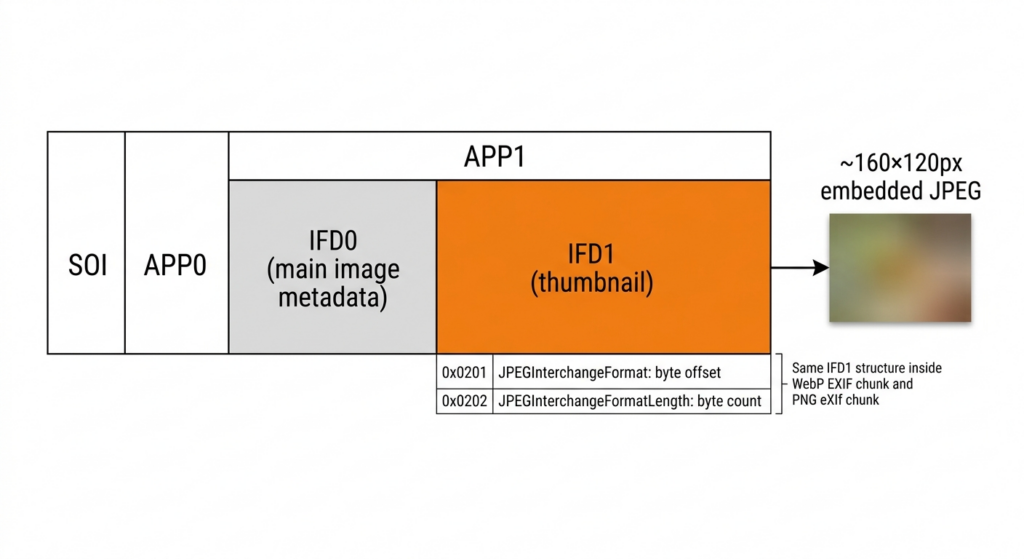
There is a small image embedded inside most camera-produced files — JPEG, HEIC, camera RAW, and any WebP or PNG that preserves EXIF metadata. Video files carry one too: MP4, MOV, MKV, and WebM containers all embed a cover thumbnail independent of the video stream itself. About 160×120 pixels. Invisible to standard viewers and media players. For photos shot on a camera or phone, the thumbnail was generated by the firmware at the exact moment you pressed the shutter, from the raw sensor data, before any software has touched the file. For video, it is written by the recording app or the software that packaged the container — and the same forensic question applies to both: when the file is edited, does the thumbnail get updated?
Where the thumbnail lives
The most common location is the EXIF IFD1 block — the second Image File Directory inside the APP1 marker of a JPEG. Two tags define it precisely: 0x0201 gives the byte offset where the thumbnail starts, and 0x0202 gives its length. The thumbnail is a complete, self-contained JPEG inside the larger file.
That IFD1 structure travels when EXIF is preserved across format conversions. WebP stores EXIF in a dedicated EXIF chunk using identical IFD conventions — IFD1 thumbnail included. PNG can carry EXIF in an eXIf metadata block, same structure again. When a camera JPEG is converted to WebP or PNG with EXIF preserved, the thumbnail comes with it.
HEIC — Apple’s ISOBMFF-based format and the iPhone default since iOS 11 — carries EXIF inside a dedicated EXIF box using the same IFD conventions (IFD0 → ExifIFD → IFD1). iPhone-shot HEIC files contain a firmware-generated IFD1 thumbnail in exactly the same way a camera JPEG does. snapWONDERS extracts and displays it, and the automated mismatch comparison runs for both HEIC and AVIF.
TIFF-based camera RAW formats (DNG, CR2, NEF, ARW, ORF, PEF, SRW, 3FR, RWL, ERF, DCR) go further: they embed multiple preview images at different sizes — the small IFD1 thumbnail and a separate larger embedded JPEG preview, sometimes at near-full resolution. Each is a distinct capture-state snapshot inside the same file. Fujifilm’s RAF locates the thumbnail by scanning an embedded JPEG container inside the RAF file for an APP1 EXIF block, then extracting IFD1 from there. Canon’s CR3 (also ISOBMFF-based) extracts EXIF from a CMT1 box using the same prefix-strip method as HEIC. In all cases, if a RAW file was processed and the resulting JPEG later edited, the embedded RAW previews and the JPEG’s own IFD1 thumbnail can diverge independently. snapWONDERS runs the automated mismatch check for Fujifilm RAF, Canon CR3, and most TIFF-based RAW formats where a SubIFD JPEG preview plane is present — NEF, ARW, and most DNG files carry one at ~960×640 or larger, which the check uses as the comparison baseline. For CR3, the largest embedded JPEG preview from the ISOBMFF track structure serves the same role. For RAW formats without a recoverable JPEG preview plane, the thumbnail is extracted and displayed for manual inspection.
There is also a separate thumbnail specific to Photoshop: the APP13 Photoshop Image Resource Block at resource ID 0x040C, written by Photoshop when saving a JPEG. This is distinct from the EXIF IFD1 thumbnail — it reflects the Photoshop state at save time, not the original capture. Photoshop-saved files may contain both, and they do not always agree with each other.
Most people are unaware any of this exists. The question that makes it forensically relevant: when the main image is edited, does the thumbnail get updated?
How firmware generates it
Your camera doesn’t build the JPEG in one pass. First, the sensor data is processed through the ISP (Image Signal Processor). The thumbnail is generated from that processed sensor data — a downscaled version of what the camera’s optics captured at the moment you pressed the shutter. Then the main JPEG compression runs separately at full resolution.
By the time any software has seen that file, the thumbnail already exists. It reflects reality at capture: the framing, the content, the people in frame, the colour as the camera recorded it.
Whether editing software updates it
This is where the nuance matters — and it’s more complex than “most tools leave it unchanged.”
Most professional and modern editing tools — Photoshop, Lightroom, GIMP, and many mobile editors — do regenerate the IFD1 thumbnail when saving a significantly edited file. The correct sequence: decode the edited main image, generate a new downscaled thumbnail from it, re-encode it, and rewrite it into IFD1. When this is done properly, the thumbnail reflects the edited state of the image.
Many simpler tools, batch processors, command-line utilities, and older or less-maintained applications skip the step entirely. They rewrite the main image and leave IFD1 unchanged — either for speed, or because thumbnail management wasn’t implemented.
Even tools that normally regenerate the thumbnail don’t always do so in every workflow. A quick metadata-only save, a batch export-then-reimport, or an in-place rewrite via a scripted operation can leave the thumbnail from an earlier state — even in software that would update it under normal use.
The forensic significance is in that inconsistency across the ecosystem. When you’re examining an unknown file from an unknown workflow, you cannot assume any particular tool updated the thumbnail. A mismatch between the thumbnail and the main image requires explanation. The absence of a mismatch is less informative: it may mean the tool was thorough, or it may mean the image was never edited. The mismatch is the finding; the clean check is not confirmation of authenticity.
What mismatches reveal in practice
The forensic value depends on what was changed and whether the editing tool failed to regenerate the thumbnail.
Object and person removal is the most significant case. If someone was removed from the main image — via inpainting, content-aware fill, or manual cloning — and the editing tool left the thumbnail unchanged, that person is still visible in a structure 160 pixels wide embedded in the file header.
Cropping shows a wider original field of view. An image cropped to remove something from the edge of the frame — a bystander, a sign, a detail of context — may have a thumbnail showing the full uncropped scene.
Colour and exposure correction produces subtler mismatches. If the colour temperature, brightness, or tonal range of the thumbnail differs significantly from the main image, post-processing occurred between capture and submission. On its own this is less significant — legitimate colour grading is routine. Combined with other signals it narrows the timeline.
I covered thumbnail mismatch as one of five signals in my earlier piece on detecting photo edits. This article goes deeper on the mechanism: where thumbnails live across formats and sources, which tools update them and which don’t, and what a mismatch actually tells you.
Thumbnail sources — what snapWONDERS extracts
Most people assume a file has one thumbnail. Files routinely carry several, each from a different source, each with different forensic provenance.
snapWONDERS extracts and displays every thumbnail source it encounters:
EXIF IFD1 — the primary forensic source. Firmware-generated at capture, before any software has touched the file. Present in JPEG, WebP (EXIF chunk), PNG (eXIf block), HEIC (ISOBMFF Exif box), AVIF, and all TIFF-based RAW formats — DNG, CR2, NEF, ARW, ORF, PEF, SRW, 3FR, RWL, ERF, DCR, RAF, and CR3. Tags 0x0201 and 0x0202 define the byte offset and length inside the TIFF block, regardless of the outer container format.
JFIF APP0 / JFXX — a separate thumbnail defined by the JFIF specification, embedded in the APP0 marker independently of the EXIF block. Supports three sub-types: JPEG (0x10), palette-indexed (0x11), and raw RGB (0x13). A file can carry both a JFIF thumbnail and an EXIF IFD1 thumbnail simultaneously; they are written by different systems and do not always match.
Photoshop APP13 — resource 0x0409 (Photoshop v4 thumbnail) and 0x040C (Photoshop v5 thumbnail), written by Photoshop when saving a JPEG. Reflects the Photoshop state at save time, not the original capture. A file that has passed through Photoshop may carry these alongside IFD1; disagreement between them is a signal in itself.
Multi-Picture Format (MPF) — the APP2 MPF IFD, used by some phones and cameras to embed HDR bracketed shots, stereoscopic pairs, or secondary images as subsidiary JPEG files within a single file. Each subsidiary image is a discrete complete JPEG.
C2PA claim thumbnail — the c2pa.thumbnail.claim.jpeg or c2pa.thumbnail.claim.png assertion embedded in the C2PA provenance manifest. Reflects the content binding state at the point the provenance claim was made.
Video containers (MP4, MOV, 3GP, M4V, MKV, WebM) — video files embed thumbnails independently of the video stream itself. snapWONDERS extracts them from four sources: the iTunes/QuickTime covr cover art atom (present in phone-recorded video, screen recordings, and media files via both the QuickTime mdir → covr path and the standard MP4 ilst/covr path); QuickTime mdta image-typed key-value entries written by Final Cut Pro, Logic Pro, and other Apple-authored exports; and attached JPEG/PNG files in the MKV/WebM container’s attachment block. For video thumbnails, snapWONDERS runs histogram and DQT (quantisation table) analysis on the extracted image — the same compression fingerprint checks applied to standalone image files. The pixel-level mismatch comparison does not apply to video: the comparison target is a moving image stream rather than a single frame, and video forensic analysis runs through a separate inter-frame tamper detection pipeline. AVI files carry no image thumbnail source (LIST INFO metadata is text-only), and QuickTime poster atoms and dedicated preview tracks in older MOV files are not currently extracted.
RAW SubIFD large JPEG preview — TIFF-based RAW files (NEF, ARW, DNG and others) embed a second, much larger preview — often 960×640 or larger — in a SubIFD at TIFF tag 0x014A. This is a separate capture-time image at higher resolution than the IFD1 thumbnail, and editing software is even less likely to regenerate it. For formats that carry one, snapWONDERS uses it as the comparison baseline for the mismatch check.
All of these feed into the same unified thumbnail display in the snapWONDERS analyse report, each labelled by source. A file carrying four or five thumbnail sources from different points in its history is not unusual. When they disagree with each other — or with the main image — that disagreement is the finding.
Automated mismatch comparison runs for JPEG, WebP, PNG, HEIC, AVIF, Fujifilm RAF, Canon CR3, and TIFF-based RAW formats where a SubIFD JPEG preview plane is present (NEF, ARW, most DNG). The other thumbnail sources (Photoshop APP13, JFIF JFXX, MPF, C2PA) are displayed for inspection; they have different provenance and the mismatch logic applies differently.
One thing not in the thumbnail: a MakerNote. Camera firmware writes its proprietary MakerNote data into the ExifIFD of the main image (EXIF tag 0x927C). The IFD1 thumbnail is a standalone JPEG for display — its bytes are not re-parsed for inner metadata, and cameras do not embed a MakerNote inside the thumbnail’s own EXIF block. Some manufacturers (notably Sony) embed a separate full-resolution preview at a MakerNote-specific tag, but this lives in the MakerNote blob of the main image’s ExifIFD — entirely separate from the IFD1 thumbnail block.
Coverage and limits
The standard command-line approach is ExifTool’s -ThumbnailImage -b flag, which pulls a single thumbnail from a single format. That works well when you know the format and want one output. snapWONDERS does something different: it extracts every thumbnail source simultaneously — IFD1, JFIF JFXX, Photoshop APP13 (v4 and v5), MPF, C2PA, video cover art, MKV attachments, and the SubIFD large preview in RAW files — across every supported format, labels each by provenance, and runs the automated mismatch comparison or histogram/DQT analysis as appropriate. No flags, no per-format command variants, no manual comparison step.
Three image thumbnail sources remain outside automated extraction — each for a specific technical reason. Apple’s iDOT box in HEIC files is a proprietary Apple format with no published specification; its role is fast-scroll display preview rather than capture-time forensic evidence, so the EXIF IFD1 thumbnail already covers the meaningful comparison target. Sony’s MakerNote tag 0x2008 stores a near-full-resolution JPEG in α-series ARW files, but extracting it requires Make-context-aware parsing that the current IFD pipeline doesn’t carry into tag handlers; for Sony ARW, the SubIFD JPEG preview already serves the same forensic purpose. Uncompressed TIFF strip thumbnails (IFD1 compression=1) require pixel reassembly and re-encoding before display — introducing a lossy step into what should be a read path — and almost never appear in camera-produced files.
When it’s not what it looks like
A thumbnail mismatch is a finding, not a verdict.
The absence of a mismatch is not authentication. Many professional tools correctly regenerate the thumbnail after editing. If the thumbnail matches the main image, it could mean the image is unedited — or it could mean the editing tool was thorough. You cannot distinguish those two cases from the thumbnail alone.
In-camera processing can produce mismatches. Some cameras allow in-body JPEG processing after shooting — you shoot RAW, then generate a JPEG inside the camera with different white balance or picture profile settings applied. The thumbnail in the resulting JPEG may predate the in-camera JPEG generation. This is a normal workflow, not evidence of deception.
The thumbnail alone is not a conclusion. A thumbnail mismatch combined with Huffman table evidence of software re-encoding, metadata timestamp contradictions, and ELA anomalies in a specific region is a coherent multi-signal finding. A thumbnail mismatch on its own has multiple innocent explanations.
The signal earns its weight as part of the full forensic report — not in isolation.
The gap that persists
Not every tool closes it. Not every workflow triggers the update even in tools that usually do. That inconsistency has persisted since the EXIF standard was finalised in the early 1990s, and it applies across every format that carries an EXIF block — JPEG, WebP, PNG, HEIC, AVIF, and TIFF-based RAW formats alike.
snapWONDERS extracts every thumbnail source it finds — EXIF IFD1, JFIF JFXX, Photoshop APP13, MPF, C2PA, video cover art across MP4/MOV/MKV/WebM, and the SubIFD large preview in RAW files — and displays them all in the analyse report, each labelled by source. The automated mismatch comparison runs across JPEG, WebP, PNG, HEIC, AVIF, Fujifilm RAF, Canon CR3, and TIFF-based RAW formats with a recoverable SubIFD JPEG preview plane. For video thumbnails, histogram and DQT analysis runs in place of the mismatch comparison.
→ Run forensic analysis on any photo or video
The mismatch is the finding. The clean check is not confirmation.
The thumbnail check is one step in the guide Has this photo been edited? How to check, which covers the rest too.
We tried it on one of our own photos: we gave it a new sky, and its thumbnail still showed the old one.
Kenneth Springer is the founder of snapWONDERS, a digital forensic analysis platform for images and video. The thumbnail extraction described here — covering EXIF IFD1 across JPEG, WebP, PNG, HEIC, AVIF, and all major RAW formats, alongside JFIF JFXX, Photoshop APP13, MPF, C2PA, and video thumbnail sources across MP4, MOV, MKV, and WebM — runs automatically on every file analysed through the platform. He also built Vaultify, a steganography tool for embedding hidden content within media files. snapWONDERS forensic analysis — no account required.