

The channel determines everything.
Different transmission mechanisms handle image files in fundamentally different ways — some preserve every byte intact, others run the image through a processing pipeline that strips or replaces metadata entirely. The question “can you read the metadata from a photo someone sent you?” has a precise answer, but it depends entirely on how that photo travelled to reach you.
Direct file copy — binary intact
The cleanest category is direct file copy: the file is moved from one location to another without any processing pipeline running on the image content.
FTP, SFTP, SCP — file transfer protocols move the binary unchanged. No image processing runs. Everything the camera recorded is present at the destination.
Network shares and NAS — SMB/CIFS and NFS network shares work the same way. A file copied from a NAS to your local machine via a network share is a binary copy. The caveat: some NAS products include media management features — Synology Photos and QNAP QuMagie, for example, can automatically compress or optimise images for gallery performance and storage savings. If those features are active, the file stored on the NAS may already have been processed before you retrieve it. Used purely as a file store with media management disabled, a NAS is transparent. Used as a photo management platform, it may not be.
USB drives, SD cards, external media — copying files from a camera’s SD card, a USB drive, or an external hard drive is always a binary copy. No processing, no pipeline. This is the cleanest possible transfer and the forensic baseline: what comes off the camera is what you analyse.
Cloud file sync — services that sync files as files, not as photos in a gallery, preserve the binary. A JPEG uploaded to Dropbox, OneDrive, or Google Drive (as a file, not via Google Photos) downloads byte-identical to what was uploaded.
Google Photos is a distinct case worth separating. Its Storage Saver mode recompresses images to 16 MP maximum and alters metadata in the process. Original Quality preserves the file. Sharing via a Google Drive file link and sharing via a Google Photos album link also behave differently — the file link gives access to the stored binary; the Photos share may deliver a processed version depending on how it is accessed.
Screenshots — worth naming explicitly because people do this without realising what it means forensically. If someone screenshots an image rather than saving the original file, the result is a brand new image — a PNG of the screen capture, carrying only the receiving device’s metadata. All original EXIF, GPS, camera model, and MakerNote data is gone. The forensic profile of a screenshot is entirely that of the device that took it.
Archives — bypassing the pipeline
Large files and multiple files are commonly bundled before sending. Camera RAW files (CR2, NEF, ARW, DNG, and others) run 20–50 MB each; a set of JPEG selects from a shoot can easily exceed email size limits or trigger NAS optimisation thresholds. Archiving into ZIP, RAR, or 7-Zip solves both problems.
The archive is a container, not a processor. Files inside arrive byte-identical to what was packed in. This makes archiving a useful bypass mechanism — pack the originals into an archive before uploading to a NAS with media management enabled or a cloud service with compression settings, and the optimiser has nothing to act on.
Password-protected archives add a tamper-evidence layer. The content cannot be accessed or modified without the password. A received archive that decrypts correctly and whose file structure matches expectations gives reasonable confidence the files were not altered in transit.
snapWONDERS analyses archives directly — ZIP, RAR, and 7-Zip — including password-protected ones. Each image or video inside is extracted and run through the full analysis pipeline: EXIF, GPS, device fingerprint, re-encoding detection, thumbnail sources, and all other checks. No manual extraction required before uploading.
Email is the most common document-transfer channel for professional and personal file exchange, and the most nuanced. The critical distinction is between attached files and inline images — they are handled differently by every client.
Attached files (Gmail, Outlook) — when you attach a file and send it as an attachment, the email client encodes the file as MIME attachment data and the receiving client decodes it back to the original binary. Gmail and Outlook deliver file attachments essentially as-is. EXIF, GPS, camera model, MakerNote fingerprint — all of it arrives with the file.
Inline images — pasting an image directly into the body of an email rather than attaching it is a different operation. The client embeds the image in the message body, which may involve re-encoding it into a format suited to inline rendering. Metadata may be lost in that step. Attaching is always safer for metadata preservation than pasting.
Outlook’s image resizing — the Outlook desktop app offers to resize large images before sending. If you accept that resize, Outlook recompresses the image — and that recompression can strip EXIF in the process. Declining the resize and sending at original size preserves it.
Mobile Share sheet — on some mobile devices, using the operating system’s native Share sheet to pass a photo to Gmail or Outlook may strip location data at the OS level before the email client sees the file. The stripping happens before sending, not during transport, and is invisible to the email client.
ProtonMail — has a built-in metadata remover for image attachments. It prompts the sender to strip metadata on upload and can be set to do so automatically via account settings. If the sender had that enabled, the file you receive has had EXIF stripped at the ProtonMail level before it left their account.
Tuta — end-to-end encrypts attachments but does not strip metadata. EXIF data in a Tuta attachment survives intact for the recipient to read, even though Tuta itself cannot access the file contents. Encryption and metadata stripping are two different things.
The email transport itself — the servers routing the message between sender and recipient — never touches attached file content. Routing metadata (sender IP, mail server hops, DKIM and SPF signatures) is added to the email headers, not to the attached files.
Messaging apps
Consumer messaging apps — WhatsApp, Instagram, Facebook Messenger, Signal, iMessage, WeChat, and most others — run images through a re-encoding pipeline before delivery. The pipeline compresses for bandwidth, normalises for consistent display across devices, and typically strips the original EXIF block entirely. GPS coordinates, camera model, MakerNote data — gone from what the recipient receives.
Telegram is a notable exception in that it offers an explicit choice: Document mode transmits the raw binary unchanged; photo mode runs the re-encoding pipeline. The two modes produce completely different forensic outcomes from the same app.
What survives a re-encoding pipeline in all cases is the compression signature — the DQT quantisation tables written by the platform’s encoder replace the original camera firmware signature. That substitution is itself a finding: it confirms the file was processed, and in many cases identifies which platform processed it.
The per-platform specifics — exactly what each app retains and what it strips, across different message types and operating systems — are the subject of a follow-up article. We are running our own tests across each platform before publishing those results.
MMS — carrier compression
SMS is text-only — it cannot carry images. MMS (Multimedia Messaging Service) is the older carrier standard designed for sending photos and small files over the cellular network, and it introduces the mobile carrier as a third party in the transfer.
MMS is increasingly dated. In most markets, data-based messaging apps have largely replaced it for sending photos between smartphones. It remains the fallback when both parties don’t share a common app, or when sending to a basic handset that doesn’t support app-based messaging.
MMS has size limits — typically 300 KB to 1.2 MB depending on the carrier and destination country — and the carrier’s MMS gateway recompresses images in transit to meet them. The compression is applied by the carrier’s infrastructure, not by the sender’s app or device.
The result is a re-encoded image carrying the carrier’s quantisation signature rather than the camera’s. EXIF survival varies by carrier: some preserve it, others strip it. The original GPS data may or may not arrive.
This is separate from messaging apps that operate over a data connection. WhatsApp, Signal, and iMessage over cellular data bypass the carrier MMS gateway entirely — their own pipelines run, not the carrier’s.
Proximity and wireless transfer
AirDrop (Apple) — peer-to-peer Wi-Fi Direct transfer between Apple devices. The binary is transmitted unchanged. Full EXIF survives.
Nearby Share / Quick Share (Android) — Google’s equivalent of AirDrop. Raw file transfer over a direct Wi-Fi connection. EXIF intact.
Bluetooth — raw binary transfer, no processing. Practical only for small files given the bandwidth limitation; rarely used for high-resolution images, but forensically clean when it is.
WiFi Direct — device-to-device transfer over a direct Wi-Fi connection with no internet path and no platform pipeline. Binary copy.
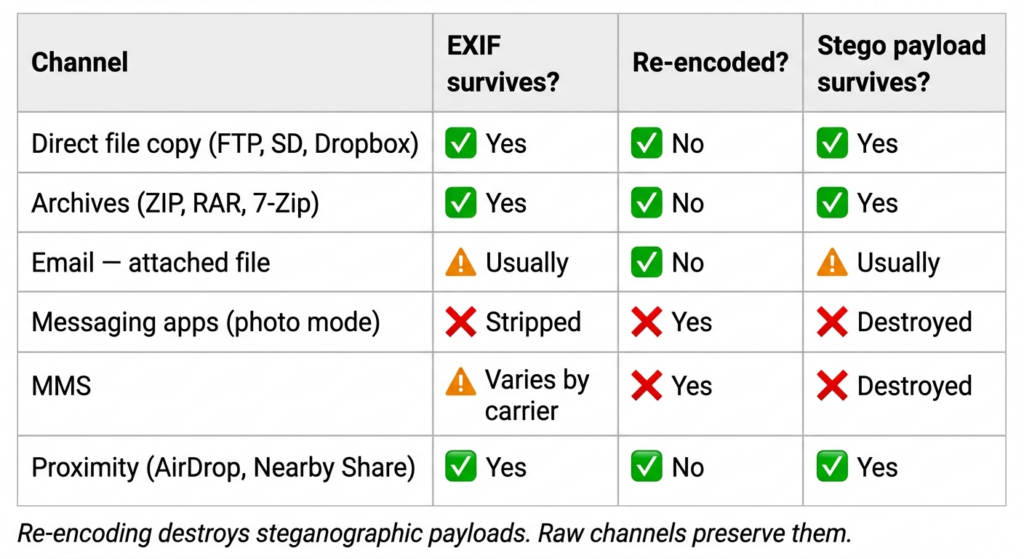
What it all means
When the channel preserves the file — you receive what the device recorded. GPS coordinates place the photo at a specific location. The camera model and firmware version are identifiable. The MakerNote carries proprietary manufacturer data invisible to basic EXIF readers — serial number ranges, scene mode, lens identification, processing parameters. Timestamps establish when. The full forensic picture is in the file.
When the channel strips EXIF — the named metadata is gone, but the compression structure remains. JPEG quantisation tables (DQT) differ measurably between camera firmware and software encoders. A re-encoded image carries the signature of the platform or software that processed it — not the original camera. That signature confirms the file was processed after capture and often identifies the encoder. Stripping EXIF removes the label; it does not remove the ink. The full mechanism is covered in the camera fingerprint article.
Steganography — if an image was used to carry hidden data — embedded using a tool such as snapWONDERS Vaultify — the choice of transmission channel determines whether the payload arrives. A raw transfer channel passes the file unchanged; the hidden content reaches the recipient intact. A re-encoding channel rewrites the pixel data and the compression structure entirely. The embedded payload is destroyed. There is no recovery from re-encoding. Anyone relying on steganographic embedding to carry information across a channel should verify the channel is raw-transfer before sending — and test it first.
Checking a received photo
snapWONDERS runs 60+ forensic checks on every uploaded file — GPS and location analysis, camera device fingerprinting, re-encoding and encoder signature detection, AI-generation detection, steganography analysis, and more in development.
Upload the photo — or the archive it arrived in — and the report covers:
Full EXIF and GPS — every field present, mapped if coordinates survive, flagged if they were stripped.
Camera and device fingerprint — make, model, MakerNote analysis, and firmware-level DQT signature. If EXIF was stripped, the compression tables still identify the encoder and often the platform that processed it.
Re-encoding detection — whether the file passed through a channel pipeline, what it stripped, and whether the original location data was in the file before it was removed in transit.
Thumbnail sources — embedded thumbnails that may predate any channel processing.
AI-generation detection — whether the image shows signals consistent with synthetic generation.
→ Analyse any photo or archive through snapWONDERS
Platform-specific results — coming in the follow-up
What each specific messaging platform does — exactly which EXIF fields are retained, whether GPS survives, what is stripped and what is kept — varies by platform, by version, by upload type, and by operating system. Claims about platform-specific behaviour are widespread online, and many are outdated.
Before publishing a platform-by-platform breakdown, we are running our own tests: uploading known files with fully documented EXIF, pulling the received image through snapWONDERS’ own analysis pipeline, and recording precisely what arrives. The results will be published once the testing is complete.
What is already established: if a platform re-encodes, the compression structure confirms it did. What the pipeline preserved or discarded is what the testing answers.
The channel determines what the metadata does. The compression structure survives regardless.
Kenneth Springer is the founder of snapWONDERS, a digital forensic analysis platform for images and video. The re-encoding detection and device fingerprinting described here — DQT and Huffman table analysis, MakerNote extraction, EXIF thumbnail sourcing — run automatically on every file analysed through the platform. snapWONDERS also analyses archives directly, including password-protected ZIP, RAR, and 7-Zip files. snapWONDERS forensic analysis — no account required.