
A JPEG by nature is an image stored in a lossy, compressed form. This means every time you save a JPEG it throws away a little information from the picture. Save it a second time and the file carries a statistical trace of the first save, within the maths of the compression itself. Forensic analysts call this concept double JPEG compression, and it’s one of the oldest clues in the field.
It matters because an edited photo is almost always a re-saved photo. You open it, change something, and save it again. That second save is where the trace comes from.
What JPEG does when you press save
The concept of double JPEG compression is a little difficult to understand, so let’s dive deeper into it.
The JPEG standard doesn’t store your photo pixel by pixel. It cuts the image into small squares of 8×8 pixels and handles each one on its own.
For each square, it works out how much of that little patch is smooth colour and how much is fine detail. This step is called the discrete cosine transform, or DCT. The result is 64 numbers per square, called coefficients. The first describes the average colour. The rest describe finer and finer detail.
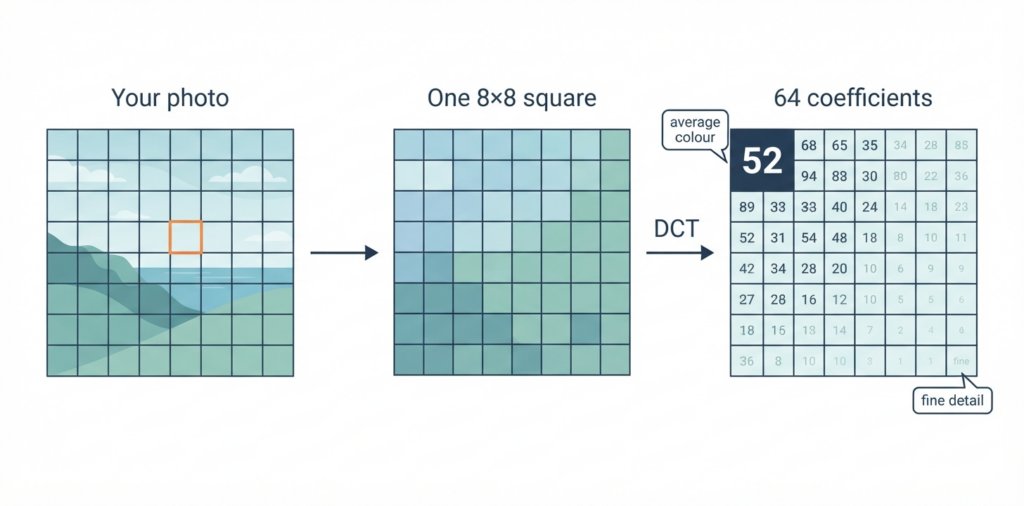
Then comes the part that makes JPEG files small. Each of those 64 numbers is divided by a step size and rounded to a whole number. The step sizes live in a quantisation table stored inside the file. Big steps throw away more detail and give a smaller file. Small steps keep more. When you drag a “quality” slider in an app, you’re really choosing that table. I’ve written before about how those tables act as a fingerprint for the camera or app that made the file (your camera’s fingerprint survives EXIF stripping). This article is about what happens when the rounding is done twice.
What a second save leaves behind
The easiest way I’ve found to picture it is a ruler. Think of rounding as measuring with a ruler that only has marks every so often.
Say the first save uses a ruler marked every 5. Every value lands on 0, 5, 10, 15, 20, 25, 30 and so on. Now the photo is opened and saved again with a ruler marked every 3. Each of those values gets moved to the nearest mark of 3:
- 0 stays 0
- 5 goes to 6
- 10 goes to 9
- 15 stays 15
- 20 goes to 21
- 25 goes to 24
- 30 stays 30
Look at what never shows up. 3, 12, 18 and 27 are perfectly good marks on the second ruler, but nothing can land on them. The first ruler already threw away the values that would have got there.
A photo saved once with the ruler of 3 uses all the marks, and a count of how often each one appears (a histogram) comes out smooth. A photo saved with 5 and then 3 has empty slots that repeat in a regular pattern. Other combinations of step sizes give the opposite effect, with some marks getting twice their fair share instead of none. Either way, the histogram picks up a repeating comb shape that a single save doesn’t produce.
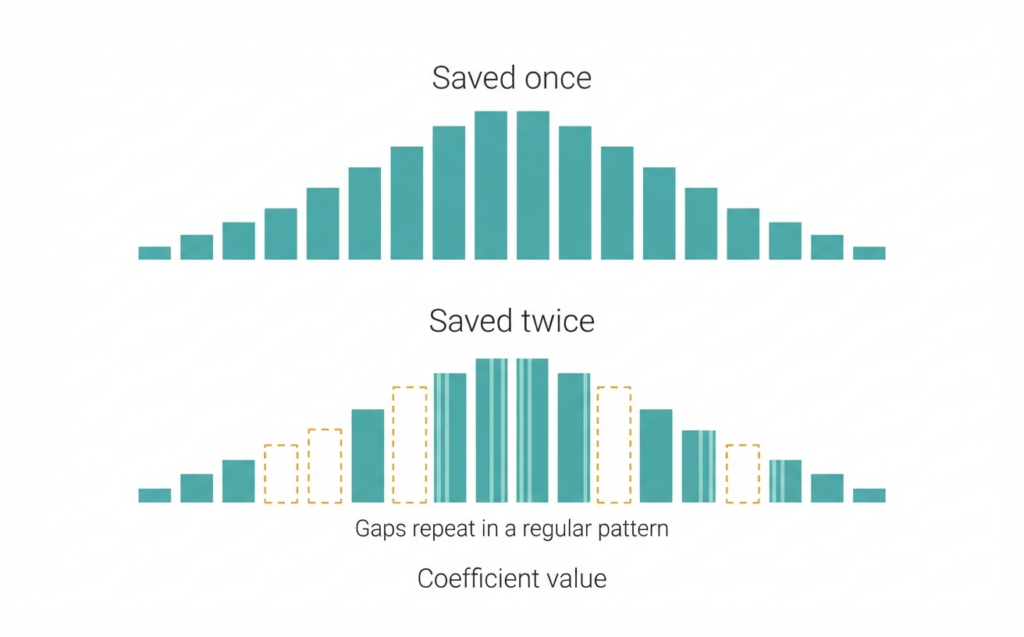
Researchers described this pattern in the early 2000s, and it has been a standard part of image forensics ever since. Your photo holds thousands of these little squares, so there’s plenty of data for the pattern to show up in.
Why an edited photo is almost always a re-saved photo
Most edits happen on pixels, not on the compressed file. The app decodes the JPEG, you brighten it or remove something or paste something in, and the app compresses the whole thing again when you save. Unless the editor does something unusual, that’s a second trip through the rounding.
So a camera original should look like one save. A photo that shows two saves has been through software after it left the camera. That’s the fact this check gives you, and it’s a useful one.
What the snapWONDERS report does with it
The report has a Double JPEG Compression section. It runs what I call a re-compression probe. It compresses the picture again at a handful of quality levels and measures how much the picture changes at each one.
For a photo saved only once, the change falls steadily as the quality goes up. For a photo that has already been through JPEG, the curve can go backwards at one of the steps, with a higher quality giving a bigger change than a lower one. That is the rounding from the earlier save showing through. When the probe sees it, the report says possible double compression.
There is a related row, the JPEG ghost, that tries to estimate what quality the earlier save used. I treat that one as a weaker clue again. In my own tests for this article it didn’t fire on any of the re-saved copies.
One detail I care about: the check looks at a window of the picture at its original resolution. Most photos get shrunk before heavier analysis to keep things fast, but resizing blends neighbouring pixels together and smears the 8×8 pattern away. Measuring on a shrunk copy would mean looking for a trace that has already been wiped out.
Where it goes wrong
This check is a medium-reliability clue. This is why I don’t rate it higher.
Re-saving is normal. Almost every big social platform and messaging app re-compresses the photos you upload. A photo that went through Facebook or WhatsApp has been saved twice before anyone edited anything. “Saved twice” tells you the file isn’t straight from the camera, and nothing more. The report itself says this under the result.
Cropping moves the grid. The 8×8 squares always start at the top-left corner. Crop a few pixels off the left or top and the old squares no longer line up with the new ones. The second save cuts across the edges of the first, and the neat pattern above gets weaker. In my own testing the probe has still caught cropped re-saves, but the trace is fainter, so I expect it to miss more of them.
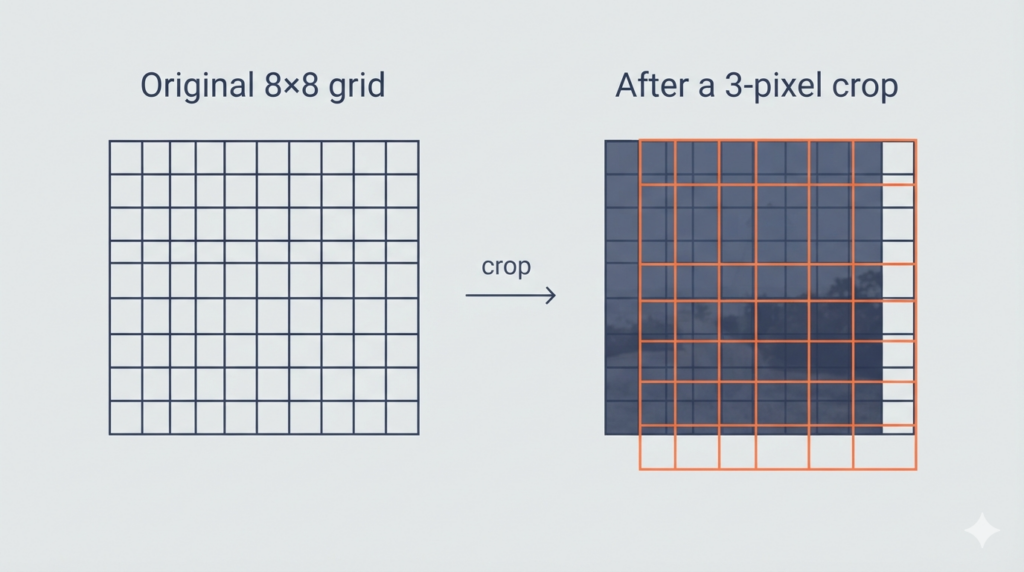
You might think the fix is to look for the grid itself and check whether it sits where it should. The report does show a block grid row for this, and it is marked low confidence for a reason. A new save lays down a fresh grid that lines up perfectly, right on top of the old shifted one. Looking at the whole image at once can’t reliably pull the two apart, so I don’t lean on that row.
Light re-saves slip past. I tried this on one of my own iPhone photos before writing it up. I saved copies at different quality settings and ran each one through the same check the report uses. Re-saved at quality 60 or 70, the probe caught it, even with 3 pixels cropped off first. Re-saved at 75 or higher, it caught none of them. The original was correctly left alone. So the probe sees a heavy second save and misses a gentle one, and a careful editor saving at high quality is exactly the gentle case.
That one is a gap in my tool, not just a quirk of the maths. The methods from the research read the stored coefficients directly and look for the comb pattern above, and they are built to see the gentle case. That’s what I’m working on next.
Quality choices can hide it. If the second save uses the same table as the first, the rounding lands on the same marks and there’s little to see. If the second save is much rougher than the first, the big second steps swallow the finer first pattern.
Resizing wipes it out. A photo that’s been resized after the first save has had its 8×8 pattern blended away before the second save ever happens.
A clue, not a verdict
Put together: when the probe finds double compression, you know the file has been through software after the camera. That’s worth knowing. On its own it doesn’t tell you whether that software was Instagram or someone hiding something. When it finds nothing, that isn’t proof of an untouched file either. That’s why it sits alongside the other checks in a report and never decides the result by itself.
If you want to go further, the same DCT coefficients hold another trace. My article on Benford’s Law and AI-generated images looks at their first digits instead of their gaps. And the complete guide to JPEG forensic analysis shows where this check fits among the rest.
Pretty neat that a file format from the early 1990s is still keeping a diary for us. Run one of your own photos through snapWONDERS and have a look at the result.
Kenneth Springer is the founder of snapWONDERS, a digital forensic analysis platform for images and video. Every JPEG you upload gets the double compression probe automatically, alongside the rest of the forensic checks. snapWONDERS forensic analysis — no account required.