
Following my last article, I must say the dashboard has been a tremendous help in how I work. No more jumping around amongst different consoles or tabs. I interact with my dashboard intuitively, and my train of thought isn’t broken. I can quickly see or search where an agent is, and even fire off a message or click an action button. Most importantly, at a glance I can see where everyone is.
It has become my IDE for agentic development at snapWONDERS. The agents write the code. This is where I see, steer and talk to all of them in one place, so I can focus on my intent. That is what matters.
The numbers so far
I started working this way on the 7th of November. In the first 12 days I ran 106 agent sessions, and 88 of them were started by another agent, each under a plan I had approved. At the busiest point 36 were open at once, running or parked.
What actually shipped
Everything they produced went out the same way: small changes, merged into the main branch and released in small batches, and nothing reached production without my approval. Small batches are the point. Each one is small enough for me to check properly.
Seeing every agent without the chatter
Every agent is a box with one colour: blue when it is working, amber when it is waiting on me, red when it is stalled, pink when it is parked and green when it is done. The yellow box from last time is now two colours: amber when it is waiting on me, red when it is stalled. A small map above the boxes shows the whole pyramid, and a click opens any agent’s card. As each part finishes it moves through waiting for release, deployed and checked, then done.
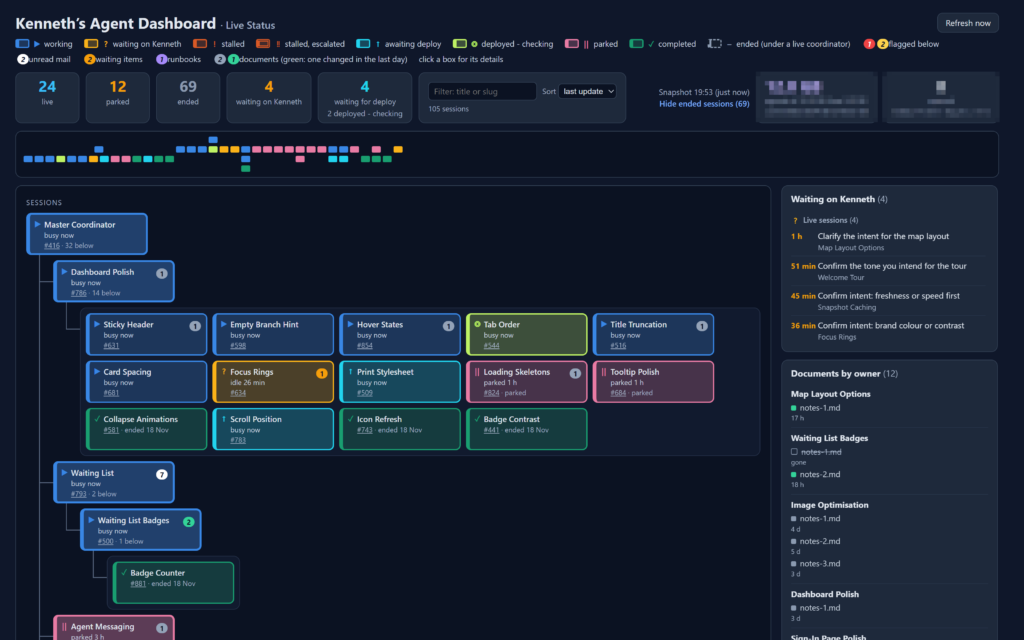
The real Agent Dashboard, running on sample data. Layout simplified; names, figures and activity are illustrative.
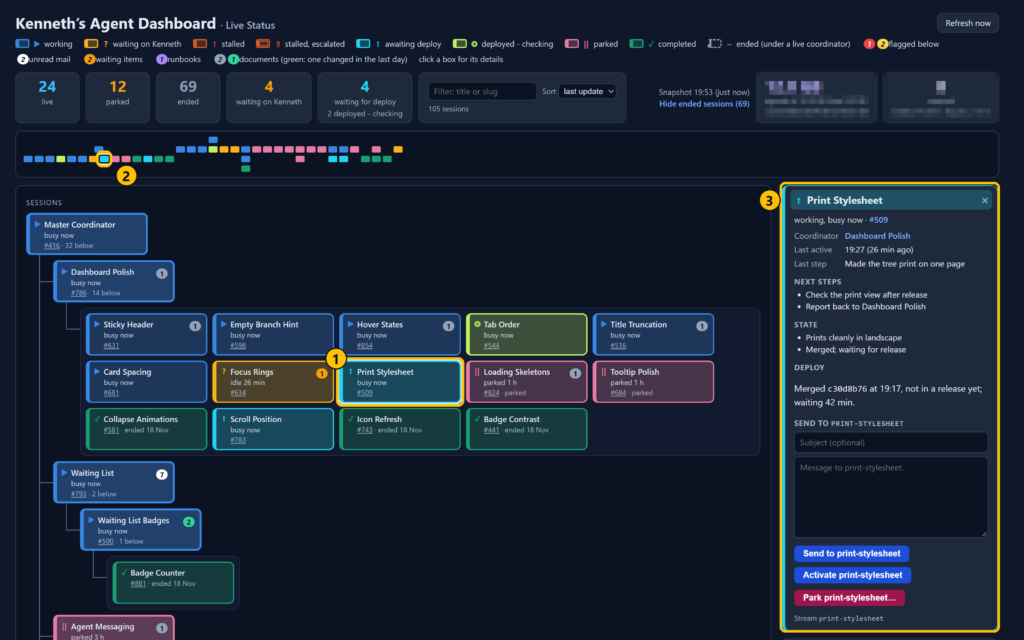
Click a box (1): its dot on the map lights up (2) and its card opens on the right (3). This one is merged and waiting for release, and is ready for a message or an action.
The agents do no extra work for any of this. The dashboard works it out from what they already write down as they go.
The part I use most is a list of every decision the agents are waiting on from me. Most of the time I am the one holding things up, not the agents. Now I clear that list in one sitting instead of finding things one tab at a time.
What it can do
- Survives a reboot. Every agent comes back in its own named tab and picks up where it left off.
- Names that stick. Every agent has a human name, like Snapshot Caching. The name stays the same even when the session underneath it is replaced, so I always know who I am talking to.
- Agents open and close agents. When work splits, an agent starts new ones, and each gets its own tab in my IDE. When they finish, they close themselves: the tab closes and their documents close with it. The dashboard, the IDE and the documents all grow and shrink together.
- Agents talk to each other. When an agent near the bottom of the pyramid finds a problem, it tells the agent above it. If that changes the intent, the update works its way through the pyramid to every agent it affects, and only to them.
- Find any agent. Type part of a name and the pyramid filters down to it.
- Jump straight in. One click brings that agent’s tab to the front of my IDE, or I send it a message from the page without leaving it.
- Park and wake. A parked agent gives its memory back and its tab closes in my IDE, but it stays on the dashboard, in pink. Wake it and the tab and its documents come back, right where it left off.
- Follow work to release. Each part shows when it is merged, waiting for release, deployed and checked, then done.
- Joined up with everything else. Each agent is linked to its own tab and documents in my IDE (pictured below), to its ticket in my ticketing system and to its pages in my documentation system. One click from the dashboard takes me to any of them.
I now spend far less time finding things and far more time setting intent.
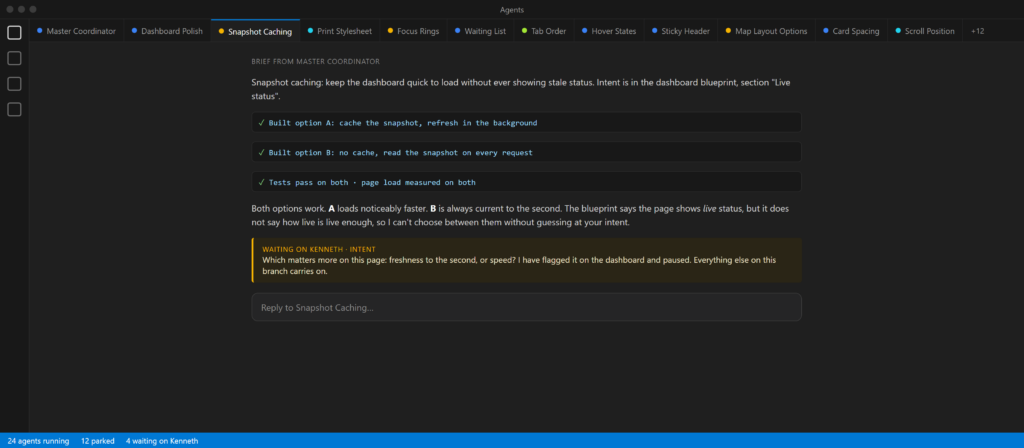
Illustration: every agent is a named tab in my IDE’s agent window. This one has built two options and paused on a question about my intent.
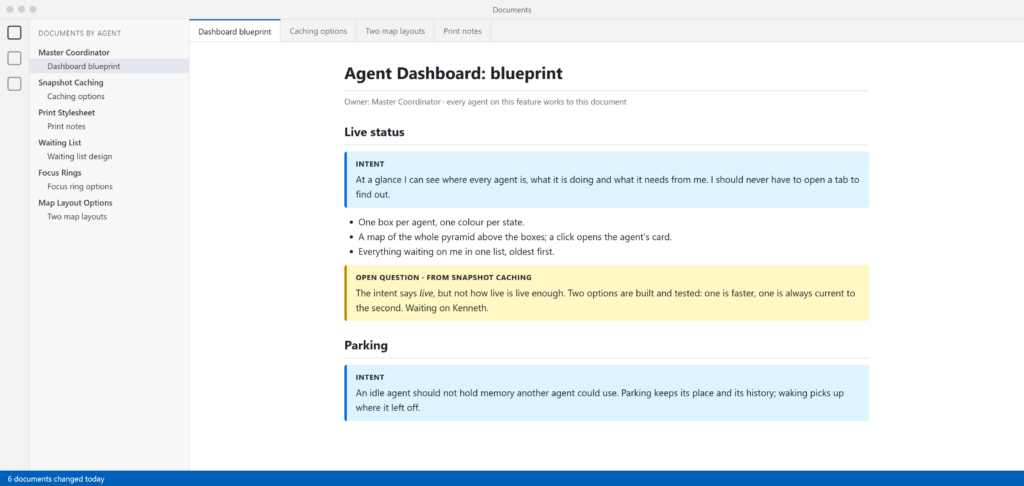
Illustration: documents open in a second, light-themed window, grouped by the agent that owns them. The open question sits in the blueprint, next to the intent it is about.
How it works
Each agent keeps a short status note as part of its normal work. One small program gathers those notes, works out who is stuck or waiting, and writes a single snapshot. The page just reads that snapshot. With one writer and many readers, the page and the agents never trip over each other.
Guardrails
From the page I can send an agent a message, put it to sleep or wake it up. The page can only ask. My machine decides whether to act, and nothing that can’t be undone is triggered from the page.
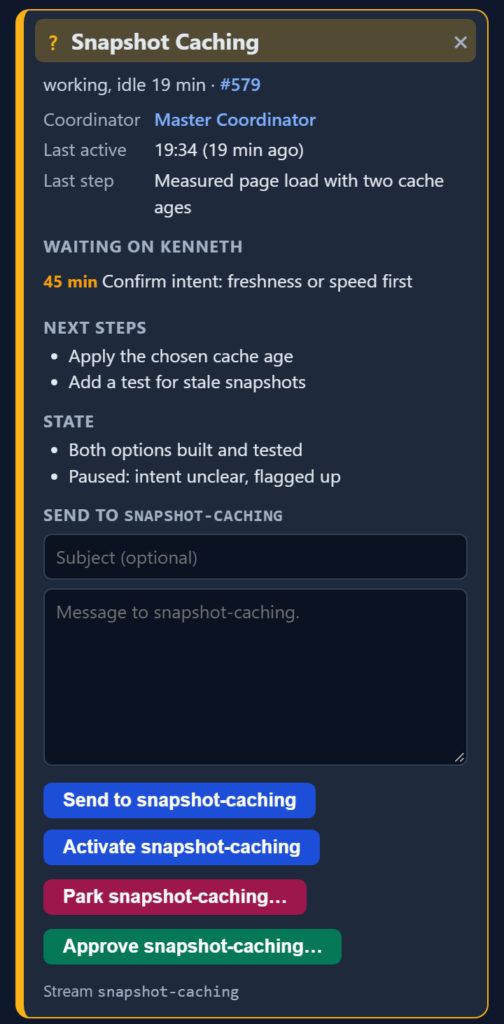
An agent’s card, on sample data: what it is waiting on me for, a message box and its buttons.
There is an Approve button too. By design it is only a reminder. I still type my approval in the agent’s own tab, after I review the work.
An agent that stops making progress turns red, and if it stays that way it is marked as escalated to me on the dashboard, without a message going up the pyramid. If that program stops, the page says so rather than showing old news as live. The designs for the risky parts were reviewed by a second, independent agent before any code was written, and anything sent to an agent is treated as information, never an instruction.
The challenge: memory
Every live agent holds memory, and with enough of them open my machine runs short. So I park agents that are sitting idle. On the dashboard they are the pink boxes. A parked agent keeps its place and its history but stops using memory. Messages wait for it, and I wake it when there is work.
I am currently working on an improvement where a watcher automatically parks agents while they are idle. The box keeps all of its interactivity, and the memory is freed for other agents to run.
This will be perfect for me. If something is waiting for a deployment and I don’t intend to do that until tomorrow, there’s no need for the agent to hold on to the memory. Once this is in, I will do the deployment, let the master coordinator know it’s done, and each parked agent will wake up, resume and handle what it needs to do.
Steering the pyramid

The pyramid from my last article, now with a dashboard to steer it.
The pyramid decides who does what. The dashboard is how I steer it. Agents split work and clean up after themselves, intent enforcers keep each feature on track, and I only step in where my intent is unclear.
I’m pretty excited to see where this goes next.
If you are building something similar with your own agents, I’d love to hear how you are doing it. Get in touch and we can compare notes.
Stay tuned!
May peace be with you.
Kenneth Springer is the founder of snapWONDERS, a digital forensic analysis platform for images and video. The platform is built this way: many AI agents on small pieces, one blueprint, and a person approving every change before it ships. snapWONDERS forensic analysis — no account required.