

We live surrounded by smartphones and digital cameras, which makes it effortless to photograph almost anything. Those photos get stored as memories, used as evidence or records, or shared online. By some estimates at least 400 million photos are uploaded to social platforms every day. That is an enormous amount of material changing hands.
It raises real questions about internet safety, particularly when we exchange and share media believing we are doing so safely and anonymously. The reality is often some distance from that.
When we share content online, we are potentially:
- exposing personal and private information;
- exposing the location where the photo was taken;
- allowing the photo to be altered in ways that can be used for tracking — see Facebook Adding Metadata: Hiding Special Instructions in Photos;
- providing material that can be used for forensic purposes.
Some of us take matters into our own hands to protect our privacy. The most common approach is also the crudest: black out, blot out or heavily pixelate the sensitive parts of a photo so they are obscured and unreadable.
The intention of this article is to offer some cyber safety awareness around digital media — and specifically, what you need to be careful about when blotting out part of a photo.
Take the photo below as an example. It was taken on a trip inland in Australia, not far from the bushfires that were raging over the Christmas 2019 and New Year 2020 period. The devastation is evident from the smoke. Parts of it have been blacked out to hide certain details.
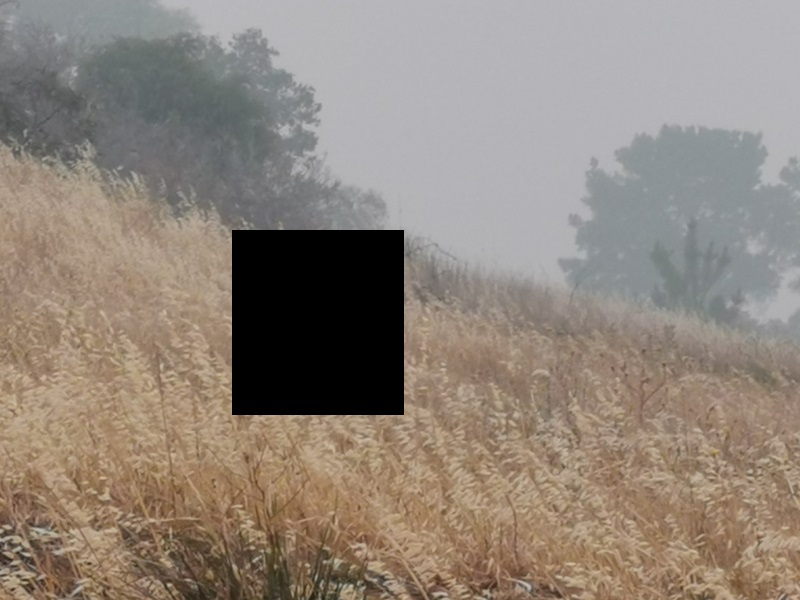
This happens constantly, and for good reasons:
- Protecting anonymity when sharing something publicly — photographing a document as evidence, but blotting out the name, address or other personal details.
- Meeting legal or privacy obligations — removing a number plate from a photo before sharing it.
- Keeping private photos private — a revealing photo with the face blacked out so identification becomes impossible. If such photos were ever leaked, the damage to reputations and careers could be considerable.
Which brings us to the question worth asking: is a photo that has been blacked out really blacked out?
The honest answer is that it depends — and that is exactly where caution is needed.
The problem is the thumbnails
Photos are generally stored and exchanged as JPEG, and a JPEG can contain thumbnails inside its metadata. Put simply, your photo may contain smaller copies of itself that you never see.
Thumbnails exist for a sensible reason. They let a computer or phone render a preview quickly without processing the full-size image, which is what you are looking at when you browse a folder of photos as small icons.
Most people know that photos store metadata and have heard of EXIF (Exchangeable Image File Format). EXIF generally holds information about the camera, potentially where the picture was taken as GPS coordinates, thumbnails, authoring and copyright information, serial numbers and proprietary manufacturer data.
There are plenty of free EXIF viewers that will show you EXIF content. But EXIF is only one form of metadata, and there are other kinds that are just as worth knowing about, sitting in the JPEG headers and structures themselves.
Depending on the manufacturer, we have found anywhere between one and four thumbnails hidden inside a single photo — and sometimes an additional two or three high-resolution images where multi-picture format (MPF) metadata has been used.
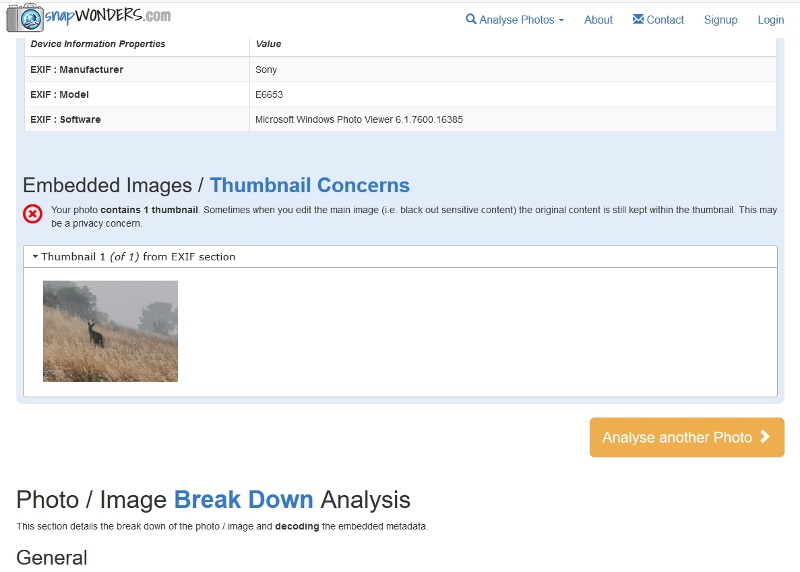
Thumbnails usually live in the EXIF metadata, but they also turn up in Adobe, Photoshop, XMP and JFIF sections, sometimes alongside other personal information. The high-resolution extras are stored in MPF sections, and can even be shots taken from a slightly different angle to the main image.
What this means in practice
If you blot out part of a photo, you need to be confident the thumbnails have been dealt with too. Otherwise the original, un-redacted content can simply be extracted from a thumbnail — and your privacy was never protected at all.
The safest habit is to check the file itself rather than trusting the edit. You can run a photo through snapWONDERS to see every thumbnail and metadata field it still carries.
We tried this on one of our own photos: we blacked out two banners, and the thumbnail still showed them.
An earlier version of this piece was published on the snapWONDERS blog and on LinkedIn. It is republished here with the internet-safety angle that the original did not cover — specifically, what to watch for when sharing media where part of the content has been deliberately obscured.